

Introduction
DLL side-loading is one of the hardest attacks to triage: a legitimate, signed EXE loads a DLL where a handful of weaponized functions hide among thousands of benign ones. Finding those few takes hours of manual work — time most analysts don’t have in triage.
In this post, we show how Threatray’s platform lets an analyst identify DLL side-loading and pinpoint the trojanized code in a real LummaStealer infection chain — in minutes, without any reverse engineering skills.
To this end we combine Threatray’s function-level attribution of malware and goodware code with AI binary code analysis. In this analysis the capability to find known benign code is key to reduce the number of functions we are passing to AI analysis. In one example we can reduce the number of functions passed to the AI analysis from 10,356 to only 9 functions.
This reduction step is absolutely essential for enabling AI analysis, and not just optional: imagine passing >10,000 functions to an AI analyst and reading all the output and vetting each verdict for hallucinations. AI is simply not yet reliable in that scenario. On top of that consider costs and time it takes an LLM to analyze that many functions. On the other hand it takes only a few seconds at most for Threatray to identify and eliminate >10,000 functions as benign.
In other words, what we show here is that a hybrid code attribution and AI analysis is the viable approach for identifying trojanized files.
The infection chain — spotting DLL side-loading
To provide a clear mental reference, here is the infection chain of this attack:
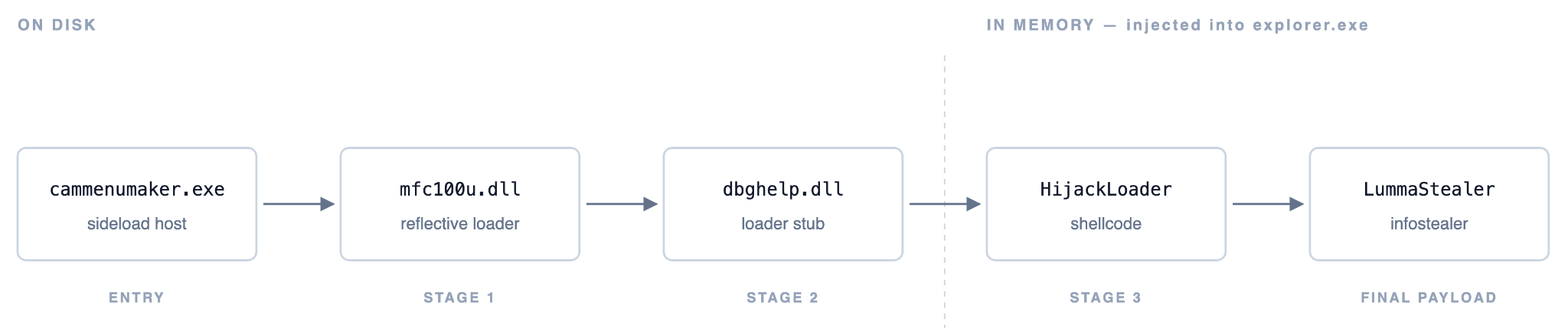
Threatray is capable of spotting every component of this chain and is specifically designed to thoroughly identify unknown code components.
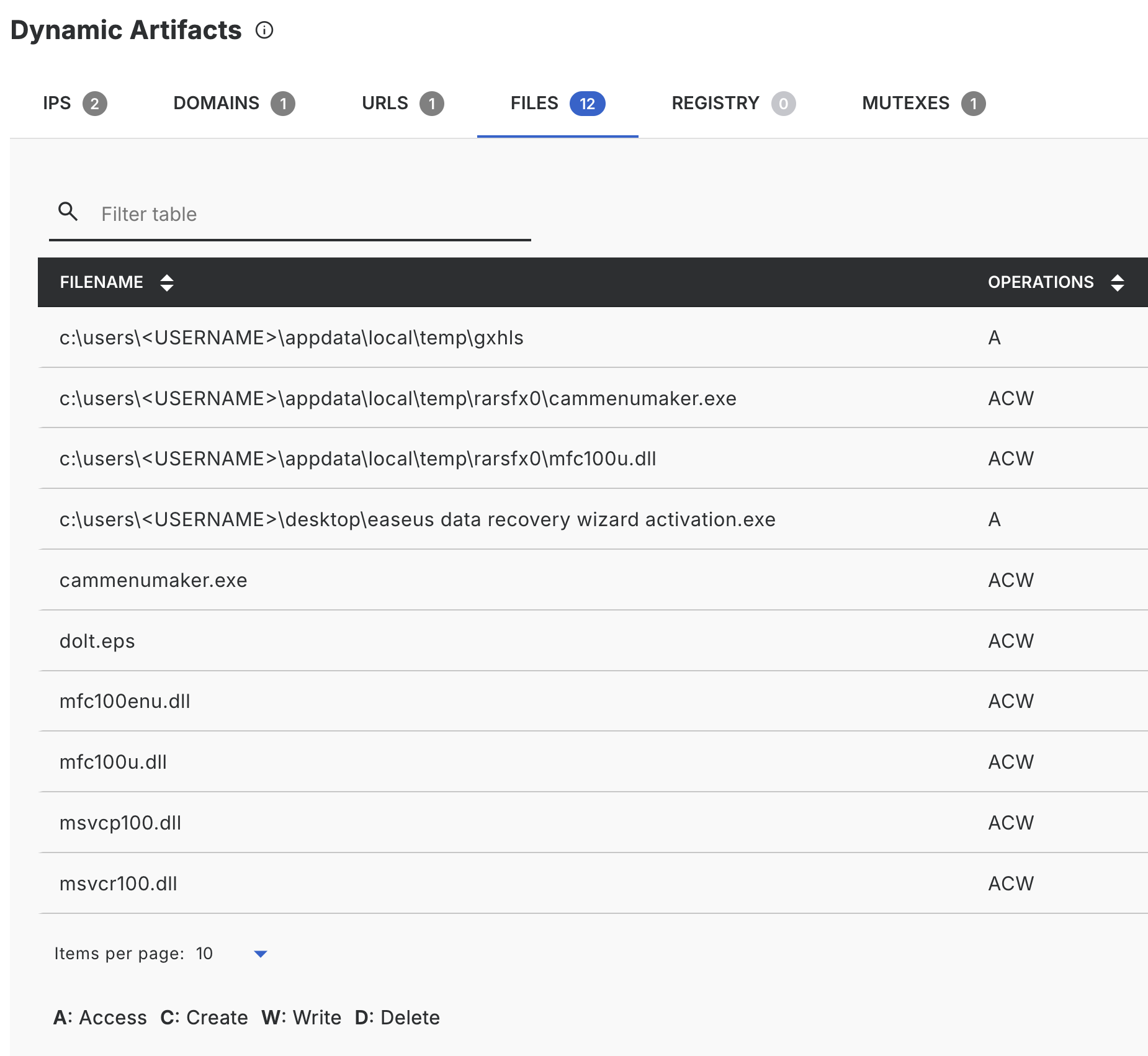
The analysis pipeline starts with sandboxing, which yields unpacked code, dropped and downloaded components, and a complete record of runtime behavior (network, processes, files). The sandbox output for this sample immediately flags a classic indicator of DLL side-loading: dropping and loading a large number of DLLs from a temporary directory.
We utilize Threatray's binary intelligence view for an in-depth analysis. This specialized view is the hub for many of our unique features, including malware family attribution through code similarity, code capability assessment, and various other intelligence features. The core purpose of the binary intelligence view is to locate, categorize, and offer intelligence on all unknown code generated during a sample's execution—whether it's the original sample, unpacked components, code injected or deployed into memory, or files written to disk.
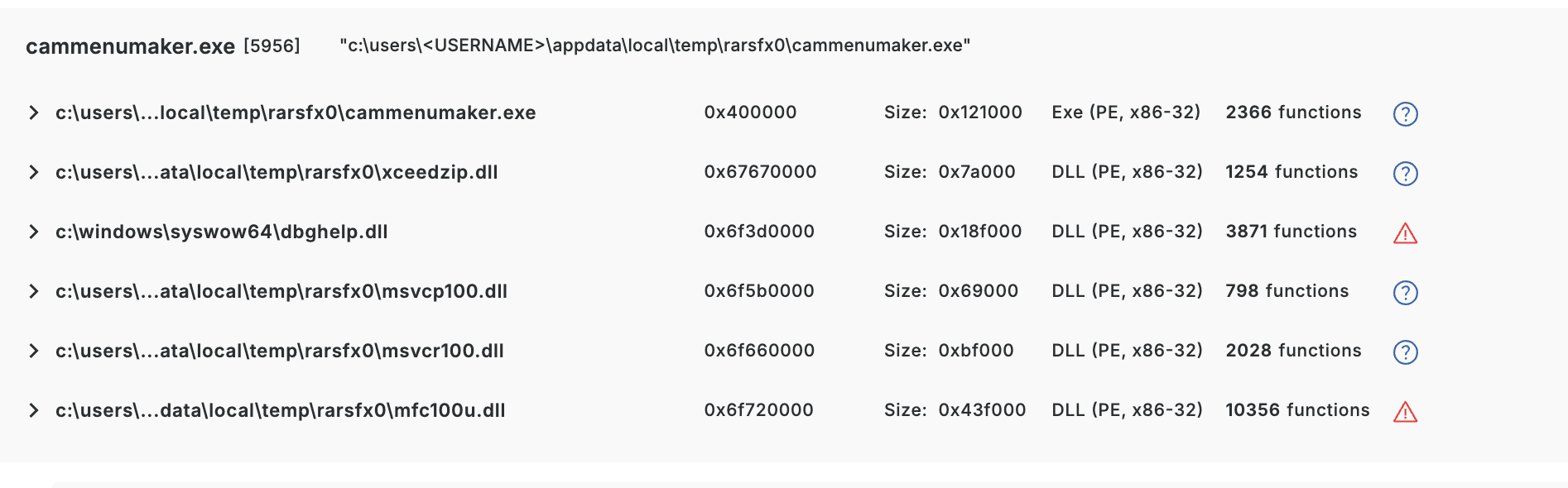
Here we see five DLLs loaded by the cammenumaker.exe process. The next question is the obvious one: which of these are legitimate, which are malicious, and what do the malicious ones actually do?
As an auxiliary signal, Threatray scans every unknown binary (on disk or in memory) with an AV engine. In the view above, two of the five DLLs (dbghelp.dll, mfc100u.dll) are flagged as malicious; the others are not. While AV provided the correct verdict here, such verdicts typically offer analysts minimal evidence for verification, understanding the outcome, or conducting further investigations.
So let's dig deeper into those DLLs.
Background: Threatray's code attribution engine
At its core, Threatray is a code attribution engine. It decomposes every unknown binary into functions (like a disassembler would), then similarity-matches each function against an ever-growing database of >1 billion labeled functions. Labels come from two sources: malware family attributions, and goodware code (compiler runtimes, open-source libraries, Windows SDK code, etc.). For every function in an unknown binary, we end up with one of three outcomes — attributed to malware (including family name), attributed to goodware (including name of runtime/library), or unattributed.
This single capability powers many features in the platform. The one that matters in this blog is the code intelligence view, which simply shows the composition of an unknown binary in terms of malware code, goodware code, and code unknown to Threatray at a function granularity level.
Why goodware code attribution matters
Identifying goodware code matters as much as identifying malware, it keeps analyst attention on the relevant code. Traditional ways of spotting such are limited: a signed DLL is the strongest signal for files on disk, and hash lookups against databases like VirusTotal also help. Detection-oriented techniques like YARA, on the other hand, aren't useful for this — YARA can only prove the presence of patterns of malicious code, never their absence.
Threatray introduces a complementary approach: function-level attribution across all functions of a binary. A key advantage is its effectiveness not just on files on disk, but also on code observed in memory. This is crucial because signatures and hashes are ineffective in memory, as in-memory code is rarely bit-identical to its on-disk version.
Eliminating benign DLLs
Threatray's goodware attribution lets us confidently rule out two of the five DLLs — msvcp100.dll and msvcr100.dll — as benign.
To see this, we open the code intelligence view for each DLL. Starting with msvcp100.dll:
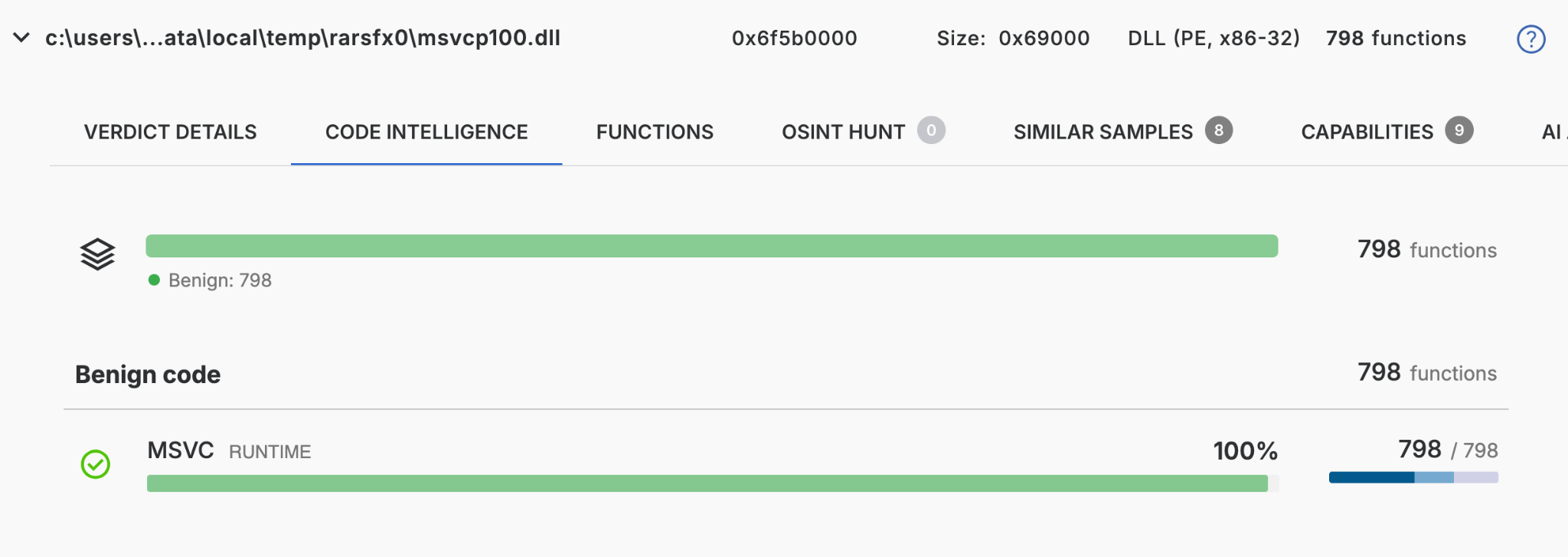
Out of 798 functions, every single one is attributed to goodware — specifically to the MSVC runtime, exactly as the DLL name suggests.
The picture for msvcr100.dll is very similar:
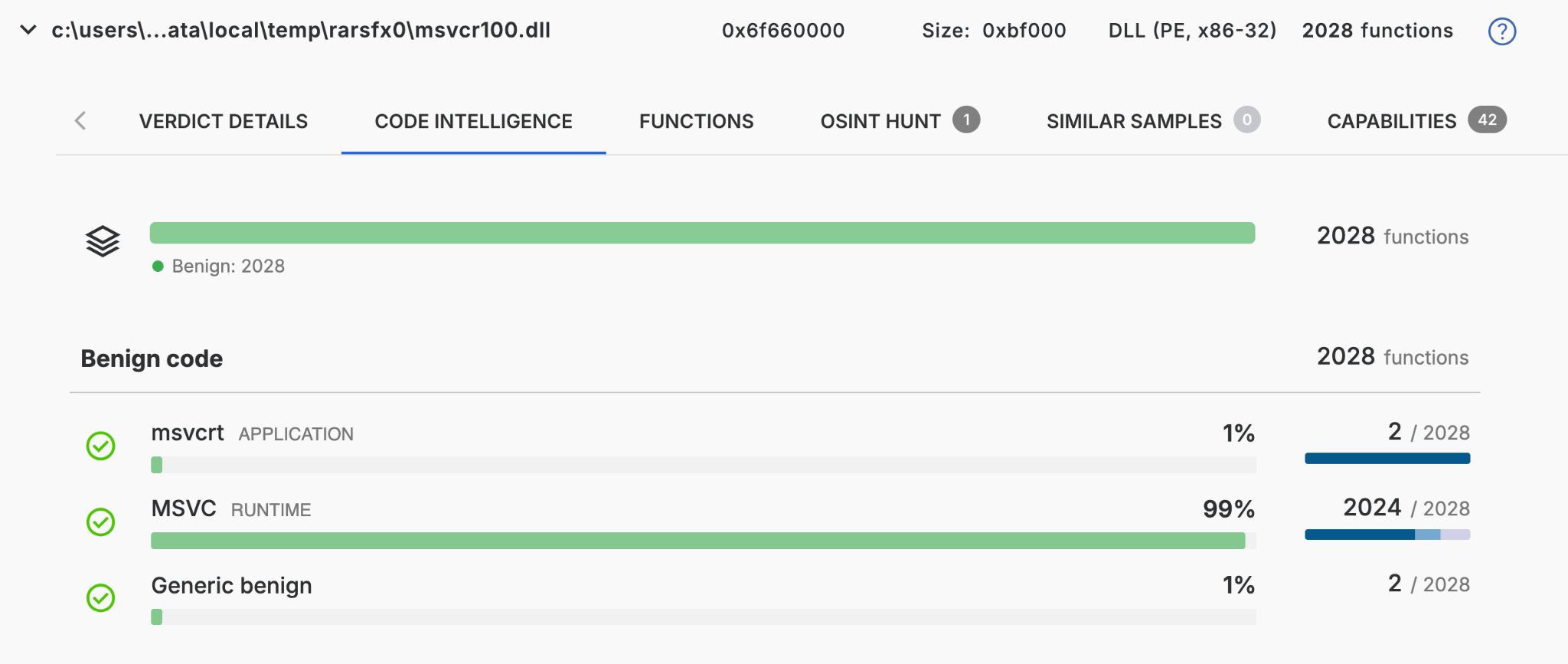
In other words, both DLLs are accounted for end-to-end — there's no unknown code hiding in either of them, and they can be safely set aside.
That leaves only the two suspect DLLs, dbghelp.dll and mfc100u.dll, to scrutinize.
Spotting the potentially trojanized code
Let’s have a look at the suspicious dbghelp.dll and mfc100u.dll. We open the code intelligence view on each one to see the function-level breakdown.
For mfc100u.dll we get:
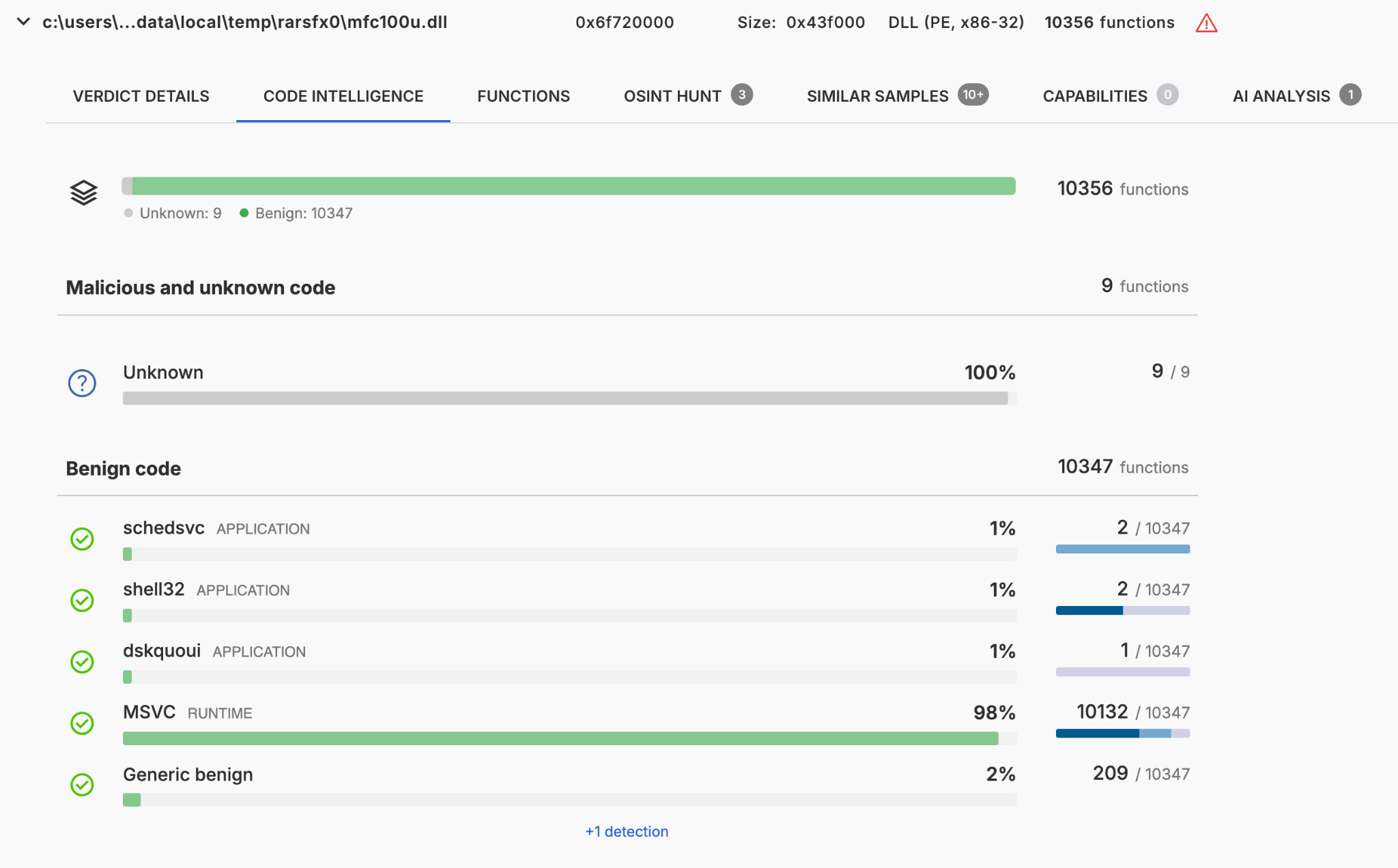
This massive DLL, with its 10,356 functions, would typically be a nightmare to analyze manually. However, Threatray's goodware identification drastically simplifies the process by confirming 10,347 of those functions as benign. This leaves a manageable total of only 9 non-benign functions flagged for further analysis.
For dbghelp.dll we get a pretty similar result:
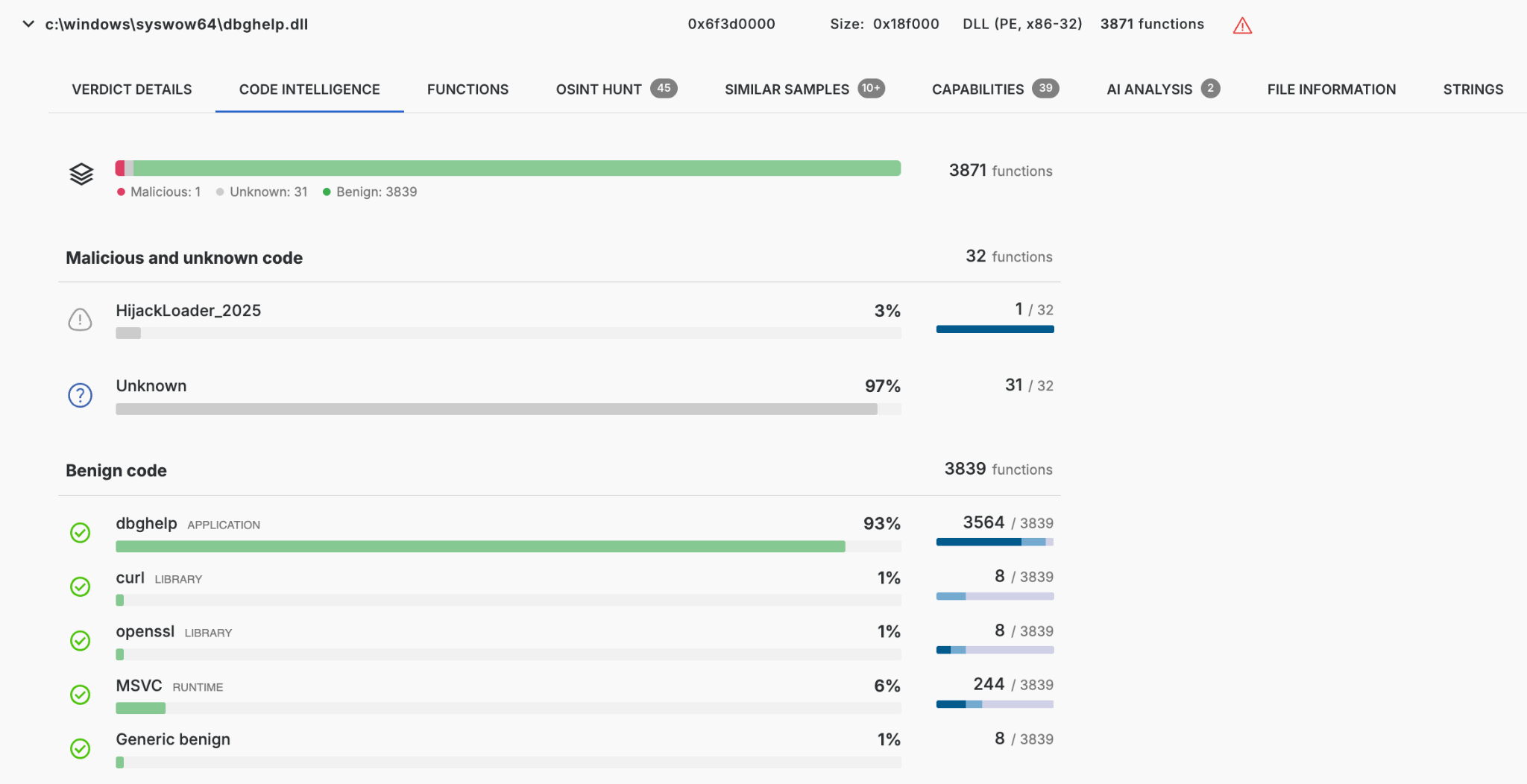
Of the 3,871 functions in this dbghelp.dll binary, 3,839 are benign, leaving 32 that are not known goodware. One of those 32 is attributed to a malware family Threatray tracks as HijackLoader_2025 — a strong hint that this DLL has loading capabilities, exactly what we'd expect from a trojanized side-loaded DLL. The remaining 31 functions are unknown to Threatray: they could be unknown malware code, or simply benign code we haven't cataloged yet.
These 32 are the functions we need to hand off to an analyst — human or AI.
Confirmation with the AI analyst
Until recently, the analyst's next step was to open each of those 32 and 9 remaining unknown functions in IDA Pro and reverse them. It's still the right move for final confirmation — but it's slow, and it assumes you're comfortable with a disassembler.
With our new AI Analysis capability, Threatray decompiles each non-benign function and asks an LLM one narrow question: "What does this code do?" The output is twofold:
- A sample-level summary — an aggregated narrative plus a set of named capabilities, grounded in the code the AI just read.
- Per-function annotations, rendered inline in the Functions tab — a short, plain-language description and a per-function verdict (benign / suspicious / malicious).
AI analysis of unknowns in mfc100u.dll
Let's see the AI analyst in action and have a look at the sample-level summary:
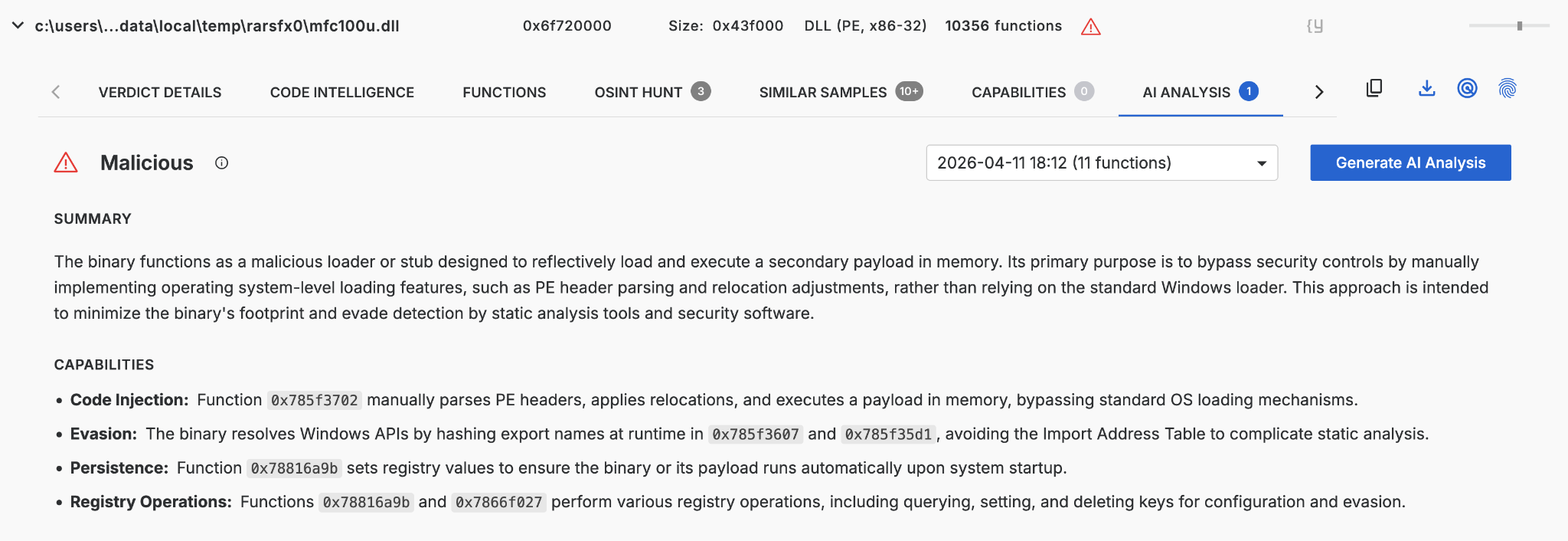
We learn the binary is a stealthy loader: it manually parses PE headers to run a payload in memory, hides its API usage through runtime hash resolution, and persists via registry run keys. This is very strong evidence that the unknown functions indeed implement malicious capabilities.
We can dig deeper and inspect the function-level AI analysis. The table below lists 8 of the 9 unknown functions that AI Analysis targeted, with their verdicts and descriptions. The one not shown falls outside the AI's current analysis scope. The same information is available in Threatray’s UI with even more context.
Notice what's happening: 3 of the 8 functions get re-classified as benign by the AI — they're utilities that the goodware corpus simply hadn't labeled yet. The AI isn't replacing the corpus; it's finishing its work on the tail. The remaining 5 functions — 2 malicious and 3 suspicious — are the actual needles in the haystack: 0x785f3702 is the loader, 0x78816a9b handles persistence, and the three suspicious helpers are the API-hashing and COM-stream machinery that support them.
AI analysis of unknowns in dbghelp.dll
Same workflow, second DLL. We run the AI analyst on the non-benign functions in dbghelp.dll and pull up the sample-level verdict first.
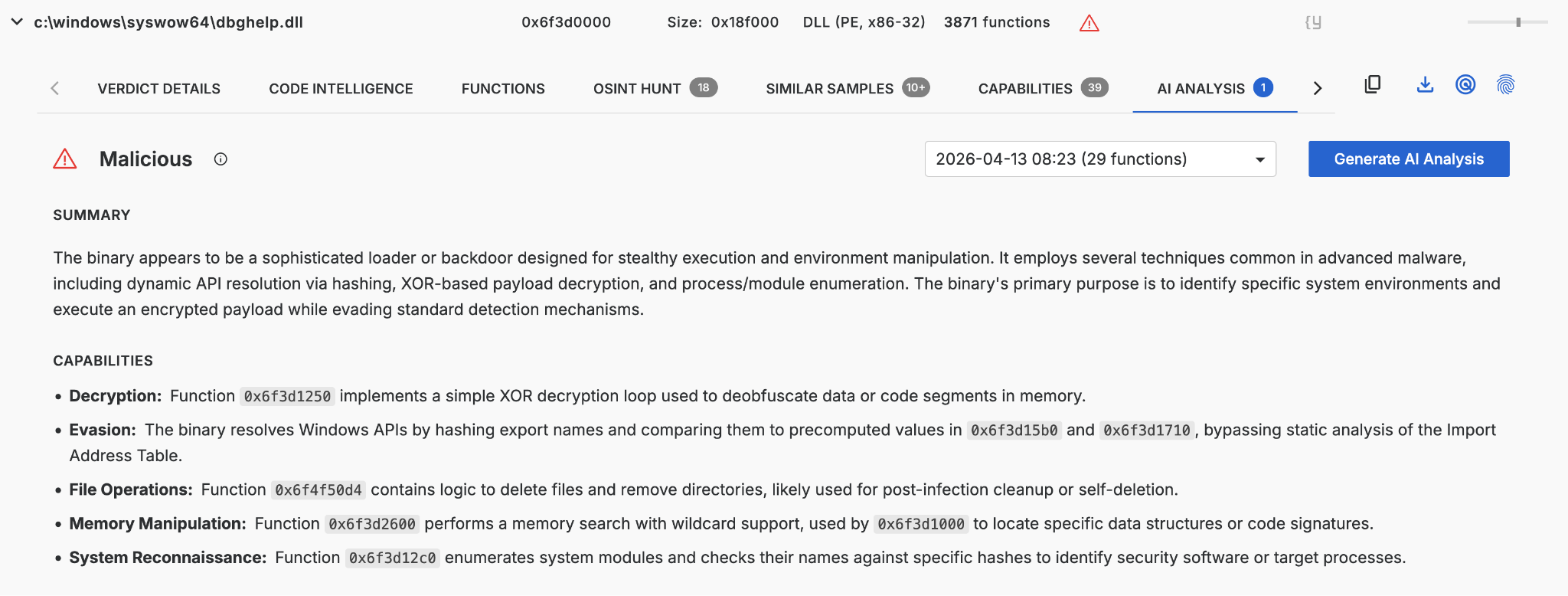
The AI's sample-level read paints the picture of an environment-aware loader stub: it resolves Windows APIs by hashing, manually traverses the PEB/LDR to locate system modules, enumerates processes and modules to fingerprint the environment (likely for security-software evasion), XOR-decrypts a payload from memory, and wraps the whole thing with a self-deletion routine for post-infection cleanup. Where mfc100u.dll was a minimal reflective loader, dbghelp.dll is doing the heavy lifting — it is the on-disk stub that produces the in-memory HijackLoader shellcode injected into explorer.exe.
We drill into the per-function annotations for the unknowns.
Of the 32 functions the AI analyzed, 21 are re-classified as benign (omitted in the table for brevity). The remaining 11 are the ones that matter: 4 malicious + 7 suspicious. The malicious ones are the loader's backbone — 0x6f3d1000 searches memory and orchestrates the XOR decryption, 0x6f3d12c0 enumerates modules against hardcoded hashes, 0x6f3d1710 walks the PEB/LDR to resolve module bases by hash, and 0x6f4f50d4 deletes files and directories after execution. The suspicious helpers are the supporting machinery: the XOR decryption loop (0x6f3d1250), the export-name hash-table lookup (0x6f3d14e0/0x6f3d15b0), and handle duplication (0x6f400b1d).
Side by side, the two DLLs tell one story: mfc100u.dll is the entry point that gets the chain running; dbghelp.dll is where the loader logic lives — fingerprinting the host, decrypting the next stage, and injecting HijackLoader into explorer.exe. The analyst never had to open a disassembler to see that.
From here the chain is routine: HijackLoader, once resident in explorer.exe, loads LummaStealer and hands it off to the infostealer. The novel work — and the focus of this post — was identifying the two trojanized DLLs that got the chain started.
Keeping humans in the loop: validating AI outputs
Verifiability is a core design goal of the entire Threatray platform — true for malware family attribution, and equally true for the new AI analyst feature. When an analyst wants to check what the AI said, the path is straightforward.
First, as you can see in the screenshots above, we've instructed our AI analysts to always reference the function addresses that implement any claimed capability. Every claim is anchored to a specific function, not made in the abstract.
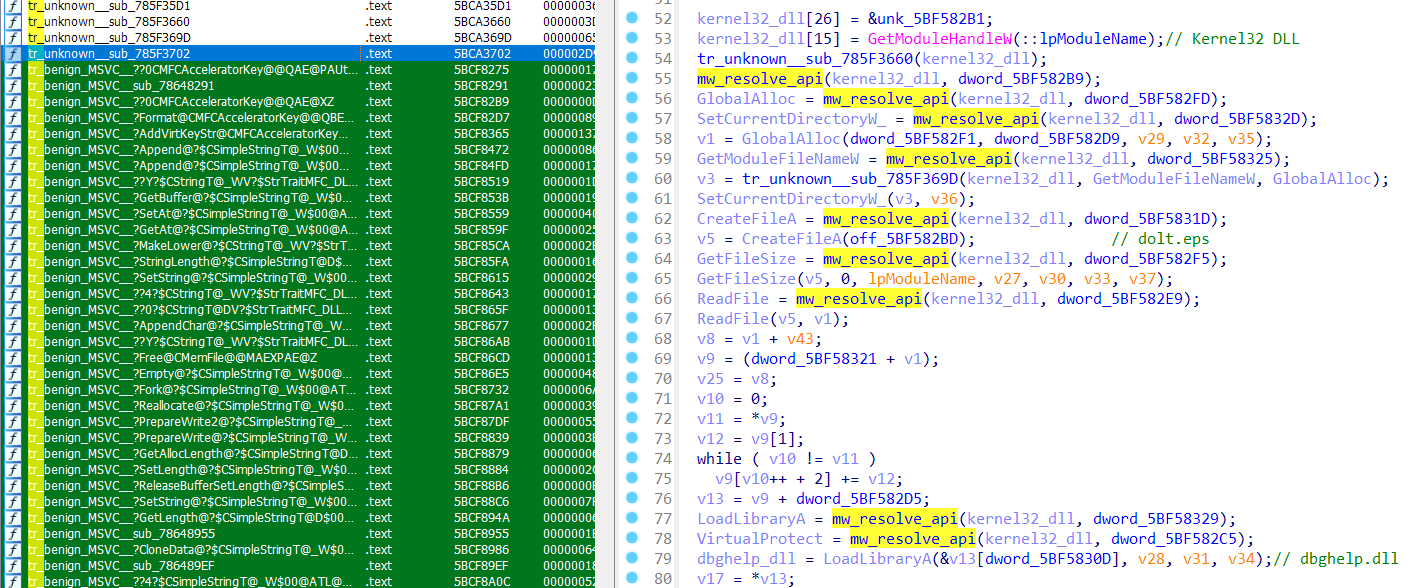
Second, those references hand off cleanly into IDA Pro via Threatray's IDA Pro plugin. We won't walk through every step — it's only a few clicks — but the workflow is: download the suspect DLL from the Threatray platform, open it in IDA Pro, and let the plugin annotate it. The plugin surfaces several Threatray capabilities inside IDA; the one that matters here is the function-level goodware/malware code attribution, which lets the analyst see at a glance what Threatray attributed to what.
We will now open the function 0x785f3702 from mfc100u.dll in IDA Pro for manual review. This will allow us to confirm the AI's verdict on this function. Note that, on the left, we can see the function attributions to MSVC code, which have been propagated into IDA Pro using our plugin.
Conclusion
This post detailed our method for quickly identifying trojanized code within a real-world DLL side-loading chain, leading to a LummaStealer infection. Crucially, this was achieved in minutes and required no traditional reverse engineering skills.
The speed and accuracy are the result of combining two core capabilities:
- Code attribution engine: reliably identifies and isolates known code — malware and goodware — at function-level granularity, leaving only a small set of unknowns for deeper analysis.
- AI Analysis: focuses its scrutiny only on that small remaining set, classifying each function and anchoring every claim to a specific address for auditability.
Neither of these components is effective in isolation. Without the initial attribution, an AI would be overwhelmed by thousands of functions, producing unhelpful noise. Conversely, without the AI layer, an analyst would still be forced to manually reverse engineer dozens of functions.
Together, however, this combination transforms what was once a triage task demanding a senior reverser and hours of work into something an analyst can complete quickly — with every step and claim remaining fully auditable.
Appendix
Sample: 64d8c3c896724d9e717823ab2381bae951d90743b6084d6ea2d42508de44ca57
Final payload: LummaStealer via HijackLoader
References: ASEC March 2025 infostealer trend report (DLL-sideloading uptick)


